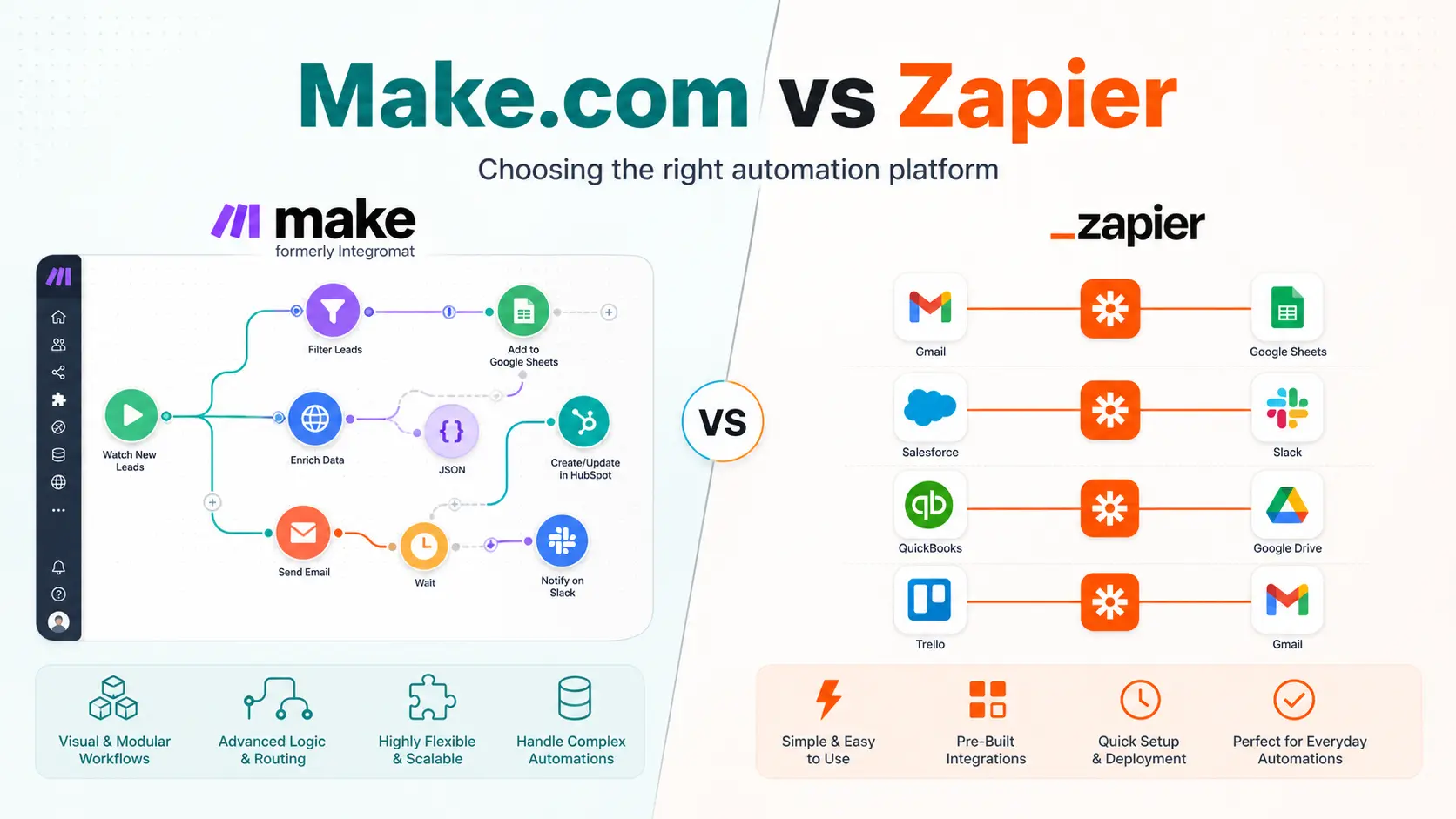
Make.com and Zapier are no-code automation platforms that connect separate apps so that one event can trigger follow-up actions automatically, but they differ in pricing structure, workflow complexity, and how far they scale.
If you are a small business owner who has started tinkering with automation, there is a very good chance you started with Zapier. And you should have. Zapier is the undisputed king of "starter home" automation. It is user-friendly, has massive brand recognition, and connects to almost everything.
But as your business scales, your processes become more complex. Suddenly, that "starter home" feels cramped. You start needing automations that don't just trigger one action, but require complex branching logic, multi-step data manipulation, and error handling. You also start noticing that your Zapier bill is creeping up every month.
At this inflection point, most of my consulting clients ask the same question: "Is there a better way to do this?"
The answer is yes. It's called Make.com OpenCode ClickUp. But migrating isn't just about switching tools - it is about changing how you architect your business.
The "Starter Home" vs. "Custom Build"
Think of Zapier as buying a pre-fabricated house. It is quick to set up, requires no real architectural knowledge, and works perfectly if your needs are standard. If you want to send a Slack message when a new lead fills out a Facebook form, Zapier is brilliant.
Make.com, on the other hand, is like getting a blank plot of land, a load of bricks, and a structural engineering toolkit. It is significantly more powerful, but it requires a builder.
Here is exactly when businesses outgrow Zapier and need the custom-build approach of Make.com:
1. Your Workflows Are No Longer Linear
Zapier is fundamentally designed for linear tasks - Trigger A to Action B. While Zapier does offer multi-step workflows on their paid plans, it handles complex logic clumsily.
Make.com operates on a visual canvas. Instead of a top-to-bottom list, Make allows you to drag, drop, and branch out complex workflows. You can visually see how a single trigger splits into five different operational routes based on the specific data of the customer. When you are auditing a broken process, seeing the entire architecture visually is the difference between a 10-minute fix and a three-day headache.
2. The Cost of High-Volume Data
This is usually the breaking point for my clients. Zapier charges based on "tasks". Every time an action happens, you pay for it.
Make.com charges based on "operations," and its pricing model is aggressively cheaper for high-volume users. For context, Make's first paid tier gives you 10,000 operations for around $16 AUD a month. To get a similar volume on Zapier, you would be paying hundreds of dollars. If you are running high-volume tasks like daily CRM syncing, e-commerce order routing, or AI content generation, Zapier will quickly become cost-prohibitive.
Make's first paid tier gives you 10,000 operations for around $16 AUD a month. Zapier charges hundreds for the same volume.
3. Real-Time Processing (Webhooks)
When a customer pays you, you want the automation to trigger instantly. This requires webhooks. Make.com includes webhooks on its free plan, bypassing standard 15-minute polling limits. On Zapier, webhooks are locked behind paid tiers.
| Capability | Zapier | Make.com |
|---|---|---|
| Workflow Model | Linear (Trigger → Action) | Visual canvas with branching |
| Pricing Model | Per task | Per operation (cheaper at volume) |
| Entry-Level Cost | ~$30 AUD/month (750 tasks) | ~$16 AUD/month (10,000 ops) |
| Webhooks | Paid tiers only | Included on free plan |
| Error Handling | Basic retry | Granular error routing & fallbacks |
| Learning Curve | Low - click and connect | Steeper - requires data literacy |
| Best For | Simple, low-volume automations | Complex, high-volume operational pipelines |
When Should You Migrate?
I tell my clients not to migrate just for the sake of it. If you have five simple Zaps that run quietly in the background and cost you $45 AUD a month, leave them alone.
However, you need to migrate to Make.com if:
- Your Zapier bill is consistently scaling with your revenue.
- You need to build multi-step workflows with "If/Then" logic and complex data formatting.
- You are tired of paying for third-party tools to handle data arrays and API connections that Zapier struggles with natively.
Is Make.com cheaper than Zapier?
Yes, at higher task volumes. Zapier charges per task, so bills climb quickly for high-volume workloads like CRM syncing or order routing. Make.com charges per operation, and its first paid tier offers roughly 10,000 operations for around $16 AUD a month, a volume that would cost hundreds on Zapier. For a handful of simple, low-volume Zaps, though, Zapier can still be the more economical choice because it needs no architectural setup.
The Catch: Make.com Requires an Architect
Make.com is cheaper and more powerful, but it has a much steeper learning curve. Because it allows you to build anything, it also allows you to build a catastrophic, tangled mess of data if you don't know what you are doing.
You cannot just click buttons and hope it works. You need to understand data structures, API endpoints, and error handling.
This is where Tech Ops Consulting comes in. Whether you need an audit of your current Zapier bloat, or you need an enterprise-grade Make.com architecture built from the ground up, I build the operational backbone so your team can spend less time fighting systems and more time doing high-value work.
How long does it take to migrate from Zapier to Make.com?
A straightforward migration of three to five simple Zaps can be rebuilt in Make.com in a day or two. Rebuilding complex, multi-step workflows with branching logic, error handling, and API integrations typically takes one to three weeks, depending on how well documented the existing processes are. The slowest part is rarely the rebuild itself; it is mapping the data structures and adding the error routing that Zapier previously hid from you.
Stop paying for software bloat. Let's architect a system that actually works for your business.